
Troubleshooting
Known Issues
Documented problems in draft 0.1. Search by title or description, then expand an issue for details and remedies.
No available servers
This happens when all listed servers are unreachable, or when they have lost trust. Open the Servers tab in the app and check each server.
Remedies
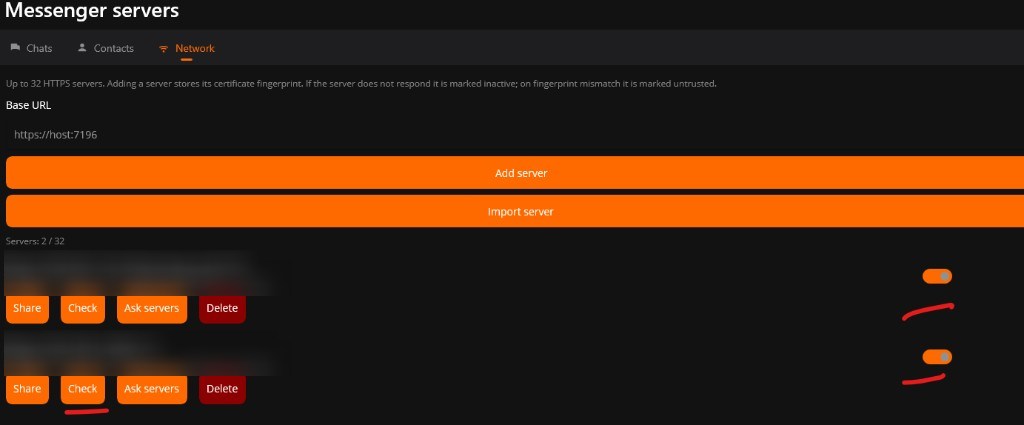
Win MAUI / Android (dark UI). On Messenger servers, tap Check on a server. Use the toggles on the right to turn a server on or off. If the certificate fingerprint does not match, the server is marked untrusted; if it does not respond, it is marked inactive.
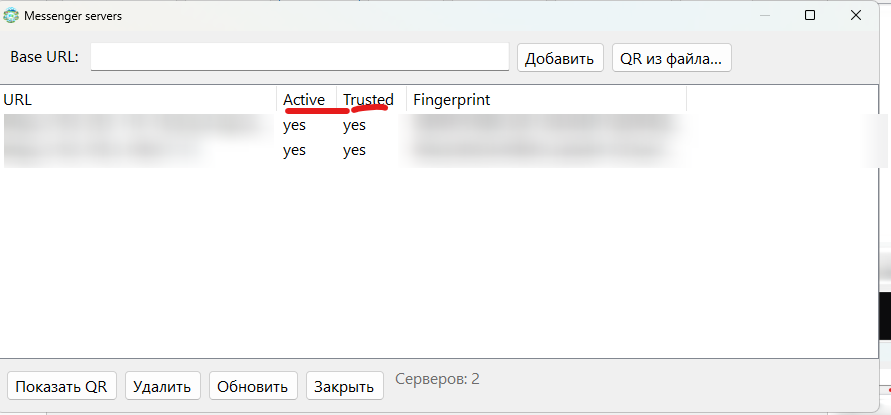
WinForms (light UI). On Messenger servers, look at the Active and Trusted columns (yes / no).
What to do. Confirm the server process is running. Re-add the server or turn it back on. If it is untrusted, compare the fingerprint and restore trust only when the host is yours. Then use Check to verify connectivity.
No issues match this search.